
If you're evaluating reservation systems for your bowling center, you've probably seen the feature comparison lists. But knowing a platform "supports online booking" doesn't tell you much about how it actually works day to day — what the guest sees, how your staff interacts with it, and whether it can handle the pricing complexity that bowling operations demand.
This post is a product deep-dive into Rex's bowling reservation features — not a comparison of different platforms (we cover that in our guide to the best bowling booking systems). Instead, this is a practical walkthrough of how Rex handles bowling reservations from end to end: what your guests experience, what your operators see, and what setup actually looks like.
The Guest Booking Flow: What Your Customers See
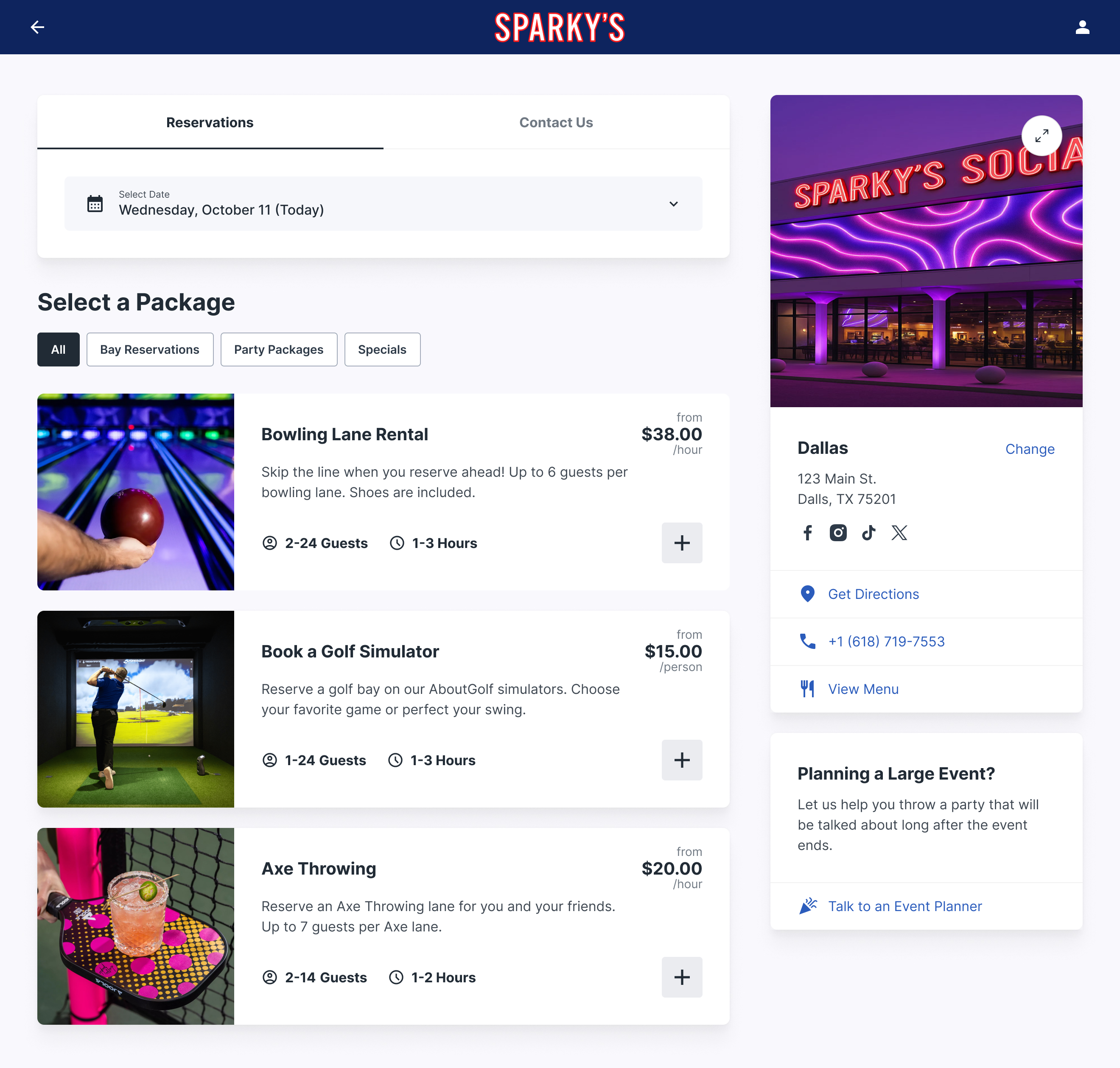
Rex's booking widget embeds directly on your website — guests never leave your domain to make a reservation. Here's the step-by-step flow a customer walks through:
1. Select an activity. If your center offers more than bowling — say, axe throwing or private party rooms — guests choose their activity first. Single-activity centers skip this step entirely.
2. Pick a date and time. The calendar shows real-time availability. Only open slots appear — there's no way for a guest to request a time that's already booked. Availability updates instantly as other guests book, so double-bookings are structurally impossible.
3. Choose group size and duration. Guests enter how many people are in their group and how long they want to bowl. Rex automatically calculates how many lanes are needed based on your configured capacity rules — for example, if you cap lanes at 6 guests each, a party of 14 would be assigned 3 lanes.
4. See pricing and add-ons. The price displays based on your rules (more on pricing configuration below). This is also where upsells appear — shoe rentals, food and beverage packages, extra game time, or whatever you've configured. Guests add what they want before checkout.
5. Pay and confirm. Guests enter payment info (processed securely through Stripe) and receive an instant confirmation email with their lane assignment, time, and any add-ons they selected. No back-and-forth, no phone call needed.
The entire flow takes under two minutes. Guests can book from their phone at 11 PM on a Tuesday night — which is when a surprising amount of weekend bowling reservations happen.
Lane Management: Real-Time Availability Across All Channels
Behind the guest-facing widget, Rex maintains a real-time availability grid for every lane in your center. This is the core of the system, and it solves the biggest operational headache in bowling: making sure what's shown as available actually is available.
When a guest books online, the lane is immediately blocked on the calendar. When your front desk checks in a walk-in, the same calendar updates. When a phone reservation comes in and your host enters it manually, availability adjusts instantly. There's one source of truth, and every channel reads from it.
You can also configure buffer times between reservations — the gap needed for lane turnover, cleaning, and resetting. If you set a 15-minute buffer, Rex automatically blocks that window so back-to-back bookings don't create chaos at the front desk. Buffer times can vary by day of week or time of day if your operation needs that flexibility.
For centers with multiple lane types — VIP lanes, standard lanes, blacklight lanes — each type maintains its own availability pool. Guests only see and book what's relevant to their selection.
Pricing Configuration: Per Lane, Per Person, or Both
Bowling pricing is more complex than most entertainment venues, and Rex is built to handle it. You can configure pricing in several ways:
Per lane pricing — a flat rate per lane per hour. Common for standard open bowling. Example: $45/lane/hour on weekdays, $65/lane/hour on weekends.
Per person pricing — charge per guest. Works well for cosmic bowling nights, party packages, or family-oriented pricing. Example: $12/person for a 2-hour cosmic bowling session.
Age-based tiers — different rates for adults, children, and seniors. Rex lets you define age categories and assign pricing to each.
Dynamic time-based pricing — prices change based on day of week and time of day. Friday night prime time costs more than Tuesday afternoon. You set the rules once and Rex applies them automatically.
All pricing models can be combined. A center might charge per lane for standard open bowling but switch to per-person pricing for cosmic bowling events. The system handles the logic — your staff doesn't need to calculate anything manually. For more strategies around maximizing what each guest spends, see our guide on how to increase bowling alley revenue.
Party Booking Capabilities
Birthday parties and group events are a major revenue driver for bowling centers — and they're also the most operationally complex bookings to manage. Rex handles party bookings as a distinct flow with its own configuration. You can learn more about growing this revenue stream in our post on increasing party bookings at your entertainment center.
Party packages in Rex can include a combination of lane time, shoe rentals, food and drink packages, private room access, and any other add-ons your center offers. You define the packages — "Basic Birthday" might include 2 hours of bowling, shoes, and a pizza package, while "Premium Party" adds a private room and custom decorations.
Guests booking a party see only the packages you've made available. They select the package, pick their date and time, enter their group size, and can add extras on top of the base package. The deposit or full payment is collected at booking, and your team gets a detailed reservation with everything they need to prepare.
This eliminates the back-and-forth phone calls and email chains that typically eat up staff time when coordinating parties. The guest books, pays, and receives confirmation — all self-service.
The Upsell Flow: Increasing Revenue Per Transaction
Rex presents upsell opportunities at the point in the booking flow where guests are most likely to say yes — after they've committed to their time and lane but before they pay. This is a deliberate design choice. Guests are already in a buying mindset, so adding a shoe rental package or an extra 30 minutes of lane time feels natural rather than pushy.
You configure which add-ons appear for each activity type. Bowling reservations might show shoe rentals, extra time, and a food package. Party bookings might show decoration upgrades and additional guests. Each add-on has its own pricing and can be toggled on or off by activity.
Centers using Rex's upsell features consistently report higher average transaction values compared to walk-in-only operations. The difference is structural — when upsells are part of the booking flow, they happen on every transaction instead of depending on whether your front desk staff remembers to ask.
The Host App: Your Staff's Control Center
The Host App is the staff-facing side of Rex. It runs in any web browser — on a tablet at the front desk, on a manager's laptop, or on a phone. Here's what your team can do with it:
Calendar view — see all reservations for the day at a glance, organized by lane and time slot. Color-coded by status (confirmed, checked in, completed, no-show).
Walk-in check-ins — add walk-in guests directly to the calendar. The system shows which lanes are available right now and for how long, so your host can assign lanes without flipping through a paper schedule.
Reservation modifications — move a party to a different lane, extend a session, change group size, apply a discount. All adjustments update the master calendar instantly.
Guest notes — attach notes to reservations ("birthday group, needs bumpers on lanes 3-4") so the next shift knows what to prepare.
The Host App is designed for speed — your front desk staff should be able to check in a reservation or add a walk-in in under 30 seconds. No training manual required.
Payments and Deposits
Rex processes all payments through Stripe, which means your center benefits from industry-standard security without managing payment infrastructure yourself. You can read more about how this integration works in our Stripe payments integration overview.
You control the deposit structure. Options include collecting full payment at booking, a percentage-based deposit (common for large group events), or a flat deposit amount. Different booking types can have different deposit rules — you might collect 100% upfront for standard lane reservations but only a 25% deposit for party bookings over $500.
Refund and cancellation policies are configurable too. You set the cancellation window (e.g., free cancellation up to 24 hours before, 50% refund within 24 hours, no refund for no-shows), and Rex enforces it automatically.
Reporting and Analytics
Rex provides real-time reporting on the metrics that matter for bowling operations:
• Revenue by day, week, month, and activity type
• Booking volume and lane utilization rates
• Average transaction value and upsell conversion
• Peak hours and underutilized time slots
• No-show rates and cancellation patterns
• Guest demographics and repeat visit frequency
This data is actionable. If your Tuesday afternoons show 30% utilization while Friday nights are at 95%, you know exactly where to focus promotions. If your upsell conversion drops, you can test different add-on positioning. The reporting isn't just about looking at numbers — it tells you where the revenue opportunities are.
Marketing Tools Built In
Rex includes marketing features that let you drive bookings directly from targeted campaigns. You can create promotional offers — weekday happy hour bowling, league night specials, holiday packages — and track which promotions generate actual bookings.
Email campaigns can target specific guest segments: past party bookers get notified about new party packages, weekday regulars see off-peak specials, and lapsed guests receive re-engagement offers. The guest data from your booking history powers the targeting — no separate CRM needed.
What Splitsville Says About Rex
With REX, we've seen an increase in our bookings, as well as an increase in revenue. — Emily Manwaring, Splitsville Lanes Owner
Splitsville is a multi-location bowling and entertainment center that switched to Rex to consolidate their reservation management. The results speak to what happens when online booking is actually easy for guests — more people book, and they spend more per visit because the upsell flow is part of the process.
Setup and Onboarding: What the Process Looks Like
Getting Rex up and running at your bowling center takes about 1-2 weeks from kickoff to live bookings, depending on the complexity of your operation. Whether you're a new center (check out our guide to starting a bowling alley) or an established venue switching systems, the process follows the same steps.
Week 1: Configuration. A dedicated onboarding specialist works with you to set up your lanes, pricing rules, buffer times, packages, add-ons, deposit policies, and booking page design. This is where the system gets tailored to your specific operation.
Week 1-2: Integration and testing. The booking widget gets embedded on your website. Stripe payment processing is connected. Your team tests the full booking flow — both the guest side and the Host App — to make sure everything works as expected.
Go live. Once testing is complete, you flip the switch and start accepting real reservations. The onboarding team stays available for the first few weeks to handle any adjustments as you settle in.
Staff training is minimal — most front desk teams are comfortable with the Host App within a day. The interface is designed to be intuitive enough that you don't need a training session to figure out basic operations.
Who Rex Works Best For
Rex is used by bowling centers of all sizes — from single-location family entertainment centers to multi-venue chains like Punch Bowl Social, FatCats, and SpareTime. The platform scales with your operation, whether you're managing 12 lanes or 60.
It's particularly strong for centers that offer more than just bowling. If your venue includes party rooms, arcades, food and beverage, or other activities, Rex's multi-activity booking lets guests reserve everything in a single transaction. That's a significant advantage over systems designed for single-activity venues.
Bottom Line
Rex isn't just a booking widget you bolt onto your website. It's a full reservation management system built for the specific complexities of bowling operations — variable pricing, lane management, party coordination, and guest upsells. The system handles the booking logic so your staff can focus on the guest experience.
If you're running a bowling center and want to see how Rex would work for your specific setup, reach out for a demo. The onboarding team will walk through your operation and show you exactly how the system maps to your lanes, pricing, and workflow.
Related Articles
• Best Bowling Booking Systems Compared
• How to Increase Bowling Alley Revenue
• How to Start a Bowling Alley: A Complete Business Guide
• How to Increase Party Bookings at Your Entertainment Center
• Stripe Payments Integration Overview