Driving range booking software is no longer a nice-to-have — it's the difference between a range that runs at 60% capacity and one that's consistently full. If you're still managing bay reservations with a paper logbook, a shared Google Calendar, or walk-in-only operations, you're leaving money on the table every single day.
The problem is that most booking platforms weren't designed for driving ranges. They're built for restaurants, salons, or generic appointment scheduling. A driving range has unique needs: bay-level resource management, time-slot pricing that changes based on demand, group lesson bookings, and the ability to handle both reservations and walk-ins simultaneously.
This guide breaks down exactly what to look for in a driving range reservation system, how the top platforms compare, and how to choose software that actually fits the way your range operates.
Why Driving Ranges Need Specialized Booking Software
A driving range is not a restaurant. It's not a hair salon. It's a resource-based entertainment venue where customers book specific physical assets — bays — for defined time windows. That distinction matters because generic scheduling tools don't understand it.
Here's what makes range operations different from typical booking scenarios:
Bay-level inventory — Each bay is a discrete bookable resource. Some bays have TrackMan or Toptracer, some don't. Some are covered, some aren't. Your system needs to differentiate between them and let customers choose.
Peak-hour demand spikes — Weekend mornings and after-work evenings pack out while midday Tuesday sits empty. If your pricing is the same at 2 PM on a Wednesday as it is at 10 AM on Saturday, you're undercharging when demand is high and overcharging when it's low.
Mixed booking types — Individual practice sessions, group lessons, corporate events, league play, and walk-ins all compete for the same bays at the same time. A system that only handles one type creates scheduling conflicts for the rest.
Walk-in coexistence — Unlike a restaurant where every table is reserved, ranges thrive on a mix of reservations and walk-ins. Your software needs to show real-time availability so front desk staff can slot walk-ins into open bays without double-booking.
Technology integrations — Modern ranges increasingly run Toptracer, TrackMan, aboutGOLF simulators, or other tracking hardware. Your booking software should connect to these systems so the right technology activates when a customer's session begins.
Generic tools force you to build workarounds for all of these. Purpose-built venue software handles them natively.
Must-Have Features in a Driving Range Reservation System
Not all booking platforms are created equal. When evaluating driving range scheduling software, these are the features that separate tools built for venues from tools built for everyone else.
Resource-Level Bay Management
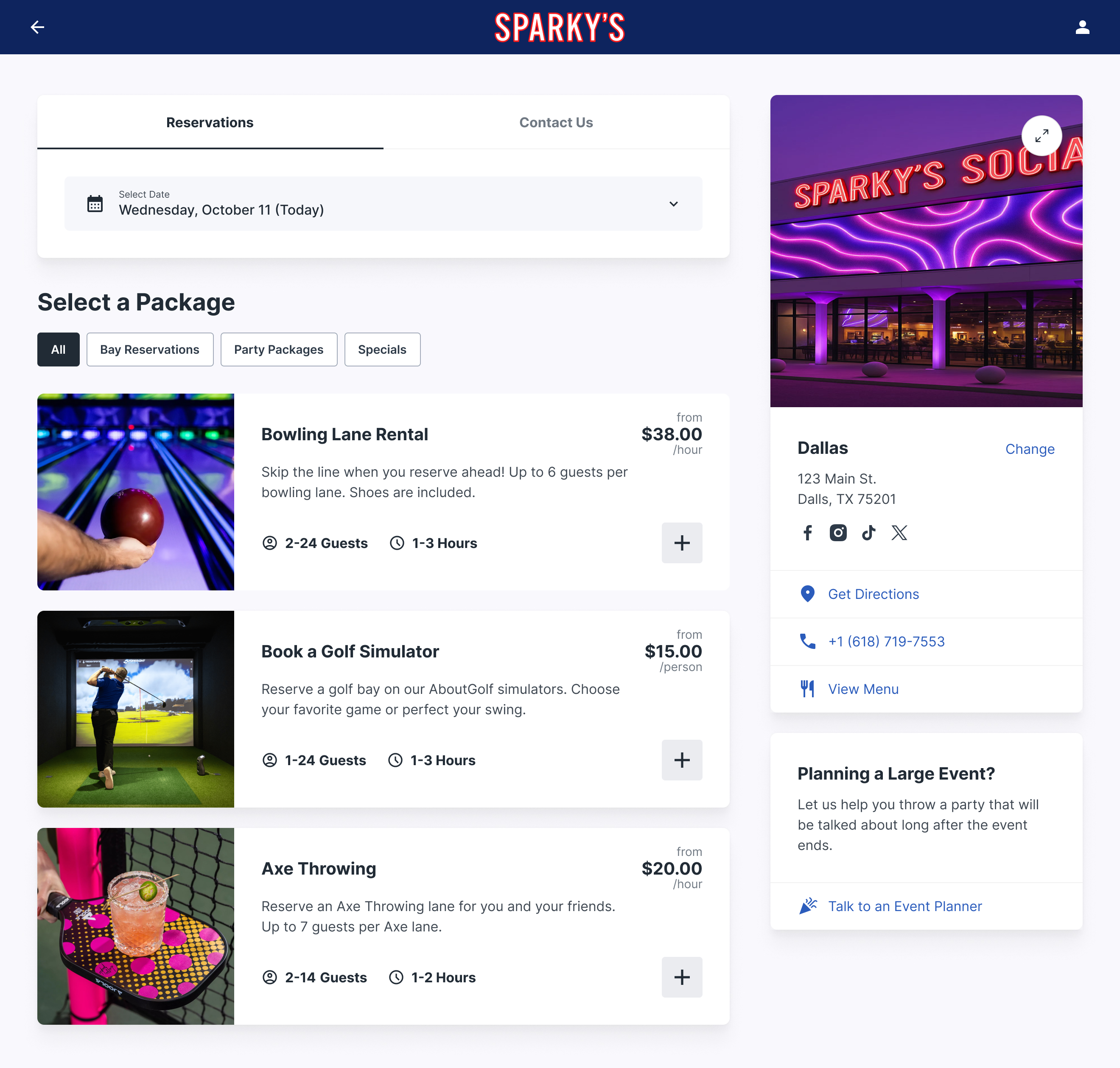
This is the table stakes feature. Your system should let you define each bay as an individual bookable resource with its own attributes — covered or uncovered, technology-equipped or standard, single or double-wide. Customers should be able to see bay types and select their preference when booking online.
Look for a visual grid or timeline view on the operator side, so staff can see at a glance which bays are booked, which are open, and which sessions are about to end. If your team has to click into each bay individually to check availability, that's a system built for a simpler business.
Online Booking With a Branded Experience
Customers expect to book online the same way they book a dinner reservation or a tee time at a golf course. Your booking page should be branded to your range — your colors, your logo, your domain — not a generic third-party widget that looks like it belongs to a different company.
The booking flow should be intuitive: pick a date, pick a time, choose a bay type, pay, done. Every extra click or confusing step costs you conversions. The best platforms also support mobile-first design since most customers are booking from their phones.
Dynamic and Time-Based Pricing
Flat-rate pricing is leaving revenue on the table. A driving range with 30 bays charging $25/hour across the board is underpricing Saturday morning and overpricing Tuesday afternoon. Time-based pricing lets you charge $35 during peak hours and $18 during slow periods — filling more bays while maximizing revenue per session.
The best systems let you set pricing rules per bay type and per time slot, so your premium TrackMan bays command a higher rate than standard bays, and weekend rates reflect weekend demand. Atomic Golf saw a 15x revenue increase after implementing smarter pricing through their booking platform — that's the kind of impact pricing flexibility creates.
Group and Event Bookings
Corporate events and group outings are among the highest-revenue bookings a driving range can land. A single corporate event blocking 10 bays for three hours can generate $2,000–$5,000 depending on your packages. Your booking software should make it easy to create group packages, block multiple bays simultaneously, and offer add-ons like food, drinks, and instruction.
Self-service party and event booking is the gold standard. When a corporate events coordinator can configure their own group booking, select bays, add catering, and pay — all without calling your front desk — you capture bookings that would otherwise require a back-and-forth email chain that kills conversion rates.
Membership and Loyalty Programs
Recurring revenue is the most valuable revenue a range can generate. Members who pay $99–$199/month for unlimited or discounted bay time provide predictable income, visit more frequently, and spend more on food and beverages per visit than one-time customers.
Your booking software should support membership tiers with automatic billing, member-only pricing, priority booking windows, and usage tracking. If the system can't distinguish between a member and a guest at the point of booking, you'll end up managing memberships in a separate spreadsheet — which always breaks down.
POS and F&B Integration
Food and beverage is where driving ranges are increasingly making their margin. The modern range isn't just about hitting balls — it's a social destination with a bar, food menu, and lounge seating. Your booking system needs to talk to your POS so that tabs can be opened at check-in, prepaid packages include F&B credits, and reporting gives you a complete picture of revenue per guest.
Look for native integrations with modern POS systems like GoTab, Square, or Toast. The tighter the integration, the smoother the guest experience and the cleaner your data.
Automated Communications
No-shows kill range revenue because an empty bay during a booked slot is a bay you turned away walk-ins from. Automated confirmation emails, SMS reminders 24 hours before the session, and easy cancellation/rebooking links reduce no-show rates dramatically. The industry average for no-shows drops from 15–20% to under 5% with proper automated reminders.
Post-session follow-ups — asking for reviews, offering a rebooking discount, or promoting upcoming events — turn one-time visitors into repeat customers without manual effort.
How the Top Driving Range Booking Platforms Compare
The market for driving range reservation systems falls into three categories: purpose-built venue platforms, golf-specific tee time systems, and generic booking tools. Here's how the leading options stack up.
Rex
Rex is a reservation and venue management platform built specifically for competitive socializing and entertainment venues — including driving ranges, golf simulators, bowling alleys, and multi-activity centers. It treats every bay as a bookable resource with its own pricing, availability, and attributes.
Strengths for driving ranges:
Bay-level resource management — define each bay with unique pricing, capacity, and equipment tags
Dynamic time-based pricing — set different rates for peak, off-peak, and shoulder hours per bay type
Self-service party and event booking — guests build their own group packages online with multiple bays and add-ons
Built-in membership management — recurring billing, member pricing, and usage tracking without third-party tools
Hardware integrations — connects with aboutGOLF, Steltronic, and other activity-specific technology
GoTab POS integration — deep F&B connection for unified guest experience
Fully branded booking page — standalone booking page that matches your range's brand, not a generic widget
Rex's pricing is flexible with no long-term contracts. Ranges can upgrade or change plans as they grow without being locked into annual commitments.
ForeUP and Golf-Specific Tee Time Systems
Golf-native platforms like ForeUP, Lightspeed Golf (formerly Chronogolf), and Club Prophet handle tee time management well. They were designed for golf courses and understand tee sheets, player handicaps, and pro shop operations.
The limitation for driving ranges: these systems think in tee times, not bay sessions. A golf course books four players onto a tee at 10-minute intervals. A driving range books individuals or groups into bays for 30–90 minute blocks. The booking logic is fundamentally different. You can force-fit a tee time system to manage bays, but you'll spend time building workarounds for group bookings, variable session lengths, and resource-specific pricing.
If your business is primarily a traditional golf course with a range attached, a golf-specific system might make sense because it handles the course side well. But if the driving range is your core revenue driver, or if you're adding simulators, F&B, and entertainment elements, you'll outgrow a tee time system quickly.
ROLLER
ROLLER is a venue management platform that gained traction with trampoline parks and family entertainment centers. It handles ticketing, waivers, and party bookings with a strong online checkout flow.
For driving ranges, ROLLER's ticketing model can feel awkward. Ranges need bay-level reservations with time-based pricing, not general admission tickets. ROLLER does offer resource scheduling, but it's layered on top of a ticketing-first architecture. Ranges with simpler operations may find it workable, but venues that need deep bay management, golf-specific hardware integrations, or flexible membership programs may hit limitations.
CenterEdge
CenterEdge is a full venue management suite popular with FECs, offering POS, ticketing, arcade management, and food service all in one platform. It's comprehensive for multi-attraction venues and handles high-volume walk-in traffic well.
The tradeoff for driving ranges: CenterEdge's strength is breadth, not depth in any single activity type. Its online booking experience is functional but less polished than platforms focused on reservations, and the setup complexity can be significant. Ranges that are part of a larger entertainment complex may benefit from CenterEdge's all-in-one approach, but standalone ranges will likely find it overkill.
Generic Booking Tools (Calendly, SimplyBook, Acuity)
These work for single-person appointment scheduling — think consultants, personal trainers, or tutors. They're cheap (many are free for basic use) and easy to set up.
For a driving range, they fall apart fast. No resource-level management (you can't assign bays), no dynamic pricing, no group booking logic, no POS integration, no walk-in management. You'll spend more time building workarounds than you would setting up a proper venue platform. If you're running a two-bay practice area as a side business, maybe. For anything beyond that, generic tools create more problems than they solve.
What to Look for When Evaluating Software
Beyond features, there are practical considerations that separate a good platform decision from one you'll regret in six months.
Contract Terms and Flexibility
Some platforms lock you into multi-year contracts with automatic renewals and 90-day cancellation notice periods. That's a significant commitment when you're not sure if the software fits your operations. Look for platforms that offer month-to-month or flexible terms, especially in the first year. Your needs will evolve — your contract should allow you to evolve with them.
Implementation Timeline
Cloud-based platforms can typically be configured and live within one to two weeks. Enterprise on-premise systems may take two to three months for full implementation, including hardware setup, data migration, and staff training. Factor in the cost of delayed revenue when your new system takes twice as long to launch as expected.
Data Ownership and Portability
Your guest data — emails, booking history, preferences, membership records — is one of your most valuable assets. Make sure you can export it. Some platforms make data extraction difficult or charge fees for it, effectively holding your customer relationships hostage. Ask upfront: can I export all my data at any time, in a standard format, at no additional cost?
Support and Onboarding
When your booking system goes down at 5 PM on a Friday — peak time — you need support that responds in minutes, not days. Ask about support hours, response time guarantees, and whether you get a dedicated account manager or join a ticket queue. Also check if onboarding is included or costs extra. A platform that charges $2,000 for onboarding may actually be cheaper than one that leaves you to figure it out yourself if it means you're live three weeks sooner.
How to Maximize Revenue With Your Booking Software
Installing booking software is step one. Using it to actively grow revenue is where the real ROI comes from. Here's how the most profitable ranges leverage their platform.
Implement peak/off-peak pricing immediately. Start with a simple structure: peak (evenings and weekends), standard (weekday daytime), and off-peak (early mornings and late evenings). Even a $5–$10 differential moves demand and increases total revenue. You can refine the tiers after you see how booking patterns shift.
Launch a membership program on day one. Even a simple two-tier membership (basic: 10% off all bookings, premium: unlimited off-peak sessions) creates recurring revenue and increases visit frequency. Members who pay monthly feel compelled to get their money's worth, which means more F&B spending too.
Use automated follow-ups to drive rebookings. A well-timed email 48 hours after a visit — thanking the guest and offering easy rebooking — converts at significantly higher rates than general promotional emails. The guest's experience is fresh, and the friction to rebook is minimal if the email links directly to their preferred bay and time slot.
Build packages that combine activities. If your range offers lessons, simulator time, or food packages, bundle them. A "Range + Lesson + Lunch" package priced at $75 is more attractive than buying each separately at $85 total — and you've captured a higher per-visit spend than a standalone bay booking.
Track and optimize your no-show rate. Require credit cards at booking and implement a clear cancellation policy (24-hour cancellation with full charge for no-shows). Combined with automated reminders, this typically brings no-show rates below 5%. Every prevented no-show is recovered revenue.
The ROI of Getting This Right
Let's put numbers on it. A 30-bay driving range charging $30/hour with 12 operating hours per day has a theoretical maximum daily revenue of $10,800. Most ranges operate at 40–50% utilization, generating $4,300–$5,400 per day.
Proper booking software typically increases utilization by 15–25% through better visibility, online booking convenience, and reduced no-shows. On a 30-bay range, that's an additional $1,600–$2,700 per day in bay revenue alone — before accounting for the revenue uplift from dynamic pricing, membership programs, and package sales.
At $500–$1,000 per month for software, the ROI isn't even a question. The cost of not having proper booking software is the real expense.
Frequently Asked Questions
How much does driving range booking software cost?
Pricing varies widely. Generic scheduling tools start free but lack venue-specific features. Purpose-built platforms like Rex typically range from $300–$800 per month depending on venue size and feature tier. Enterprise systems with POS, inventory, and full venue management can run $1,000–$3,000+ per month. The right question isn't what it costs — it's what the revenue uplift is relative to that cost.
Can I use a golf course tee time system for my driving range?
You can, but you'll be working around the system instead of with it. Tee time platforms manage sequential player slots, not bay-based sessions. They struggle with variable session lengths, multi-bay group bookings, and the walk-in/reservation mix that driving ranges rely on. If the range is a small part of a golf course operation, it may work. If the range is your primary business, purpose-built venue software will serve you better.
How long does it take to set up a driving range booking system?
Cloud-based platforms can be configured and accepting bookings within one to two weeks. That includes setting up your bays, pricing, booking page, and payment processing. Enterprise on-premise systems may take two to three months for full deployment. Factor in staff training time — even with an intuitive system, budget a week for your team to get comfortable.
Will booking software work alongside my existing POS?
Most modern booking platforms offer POS integrations — the key is how deep the integration goes. Some just pass basic transaction data, while others enable unified guest tabs, prepaid credit redemption, and combined reporting. Check whether your specific POS is supported and whether the integration is native or requires middleware.
Should I require reservations or allow walk-ins?
Both. The most profitable ranges use a hybrid model: reservations guarantee revenue and reduce idle bays, while walk-ins capture spontaneous demand. Your booking software should show real-time availability so staff can seat walk-ins in genuinely open bays. A good target is 60–70% reserved capacity, leaving 30–40% available for walk-ins and last-minute bookings.
Do I need booking software if I only have 10 bays?
A 10-bay range is arguably where booking software has the highest impact per bay. With limited inventory, every empty bay during a bookable slot hurts more. Online booking captures reservations 24/7 (not just when your desk is staffed), dynamic pricing maximizes what each bay earns, and automated reminders keep no-shows low. The smaller the range, the more each bay-hour matters.
Ready to Fill More Bays?
Rex is built for entertainment venues — including driving ranges — that need bay-level management, dynamic pricing, online booking, membership programs, and seamless F&B integration. No long-term contracts, and you can be live within a week. Book a demo to see how Rex handles driving range reservations.